July 31, 2023
Notion has built a reputation as a versatile app used by individuals and tiny teams for knowledge management, project management, and more. While there are an estimated 30 million Notion users worldwide, that still leaves a lot of humans on this planet that don’t use Notion (yet!). Luckily, there are many ways that Notion fans can make use of this tool to collaborate and share info with non-Notion users (that don’t require those folks to adopt the app for themselves).
How to share pages with non-Notion users
Before we dive into some tips and examples of how Notion can be used with folks who don’t have a Notion account, let’s cover how to publish your Notion pages.
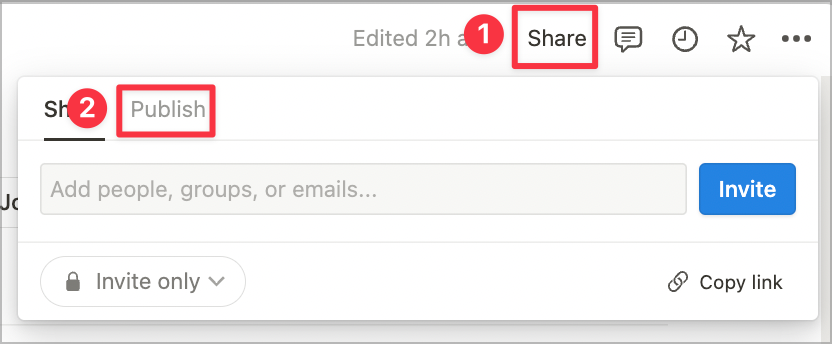
- Click
Share in the top right hand corner and select Publish from the menu.
- Click
Publish to web
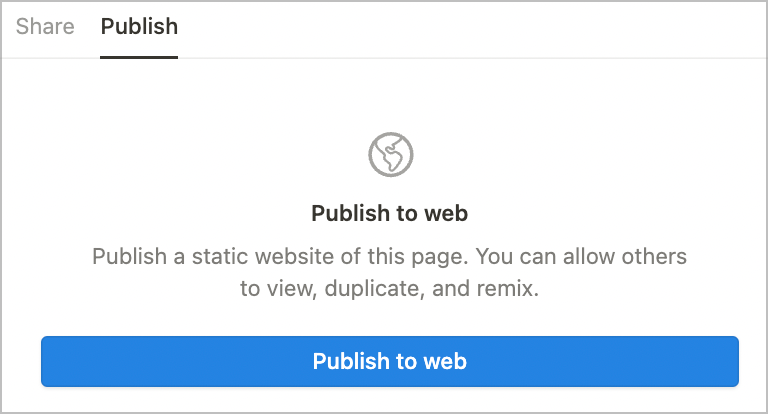
- You can then adjust the settings for your published page.
- Link expires: want this link to expire in an hour, a day, a week, on a specific date, or not at all? Set that here.
- Allow editing: even if this is toggled on, only logged in Notion users will be able to edit. If you’re sharing this page with non-Notion users, you can toggle this off.
- Allow comments: same as editing above, only logged in Notion users can comment when this is toggled on. Leave it off if you’re sharing this with folks who don’t use Notion!
- Allow duplicate as a template: likely if you’re sharing this with non-Notion users you will keep this toggled off, as they would need to login to a Notion account to duplicate the page.
- Search engine indexing: this allows pages to show up in search engine results. If this is a page that is only meant for a specific person or audience, you will probably want to disable search engine indexing for privacy.
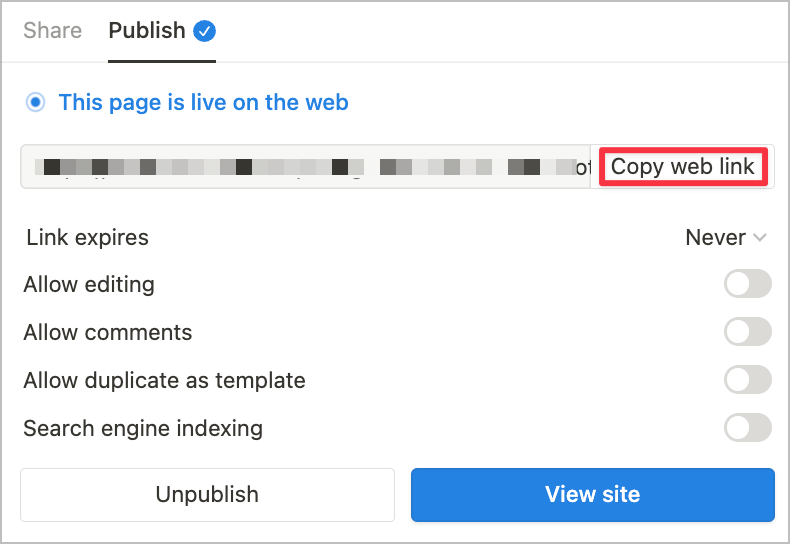
Tip: always share the page link using Copy web link shown in the image above. If you copy the link directly from the browser, folks will get a “Continue to external site by following the link below” message rather than being taken directly to your page. You can tell you’ve copied the correct link because it will have your workspace domain at the beginning of the URL (e.g. workspacedomain.notion.site).
Here are some tips for sharing Notion pages with Non-Notion users:
- Keep it simple. As much as possible, stick to headings, text, bullet points, and images. Avoid databases! They will feel less familiar to folks who don’t use Notion and may make it harder for them to make use of the information you’re sharing.
- Provide instructions. If there is any navigation that folks need to do from one Notion page to another, set it up in a way that will feel familiar to them. You can add navigation prompts (eg.
click here to return to the previous page) and hyperlink that text to take them where they want to go. If you do use databases, provide instructions to help people understand how to open up a page or adjust quick filters if they are in use. If you’re using toggles, we often hyperlink the toggle text to link to the first block within the toggle. I’ve seen many instances where folks didn’t realize the toggle opened so hyperlinking the text is helpful because if they click it, the toggle will open up for them.
- Utilize link expiry. This is a great way to make sure the information that you’re sharing publicly is only viewable while it is most timely and relevant, and to remove access to content that may become outdated over time.